Jackery Portable Power Station Review
A balanced review of the jackery portable power station, evaluating performance, charging options, safety, cost considerations, and best-use scenarios for home backup and outdoor adventures.


jackery portable power station offers silent, emissions-free backup for outages and outdoor use. It provides USB-C and AC outputs, solar-ready charging, and simple plug-and-play operation. Compared with small gas generators, it’s lighter, quieter, and easier to deploy, but its capacity and charging speed limit longer-duration high-load use for most everyday outages.
What is a jackery portable power station?
This category refers to compact, battery-powered units that store energy for later use in places without reliable grid power. The term jackery portable power station specifically points to the product lines from Jackery, a brand known for portable energy solutions. These devices combine a rechargeable lithium-ion battery, an inverter, and a control unit to provide AC, USB, and DC outputs. They’re designed for home outage backup, camping trips, RV travel, or remote work sites. Because they run on stored energy rather than fuel, they’re quiet, produce no emissions, and require minimal maintenance. In real-world terms, you’re purchasing a portable battery bank with an integrated inverter that can deliver power to select appliances and electronics. According to Genset Cost, this category has grown as homeowners seek silent, ready-to-go power options that don’t involve fuel logistics. Jackery’s models vary in capacity, number of outlets, and charging options, but they share the core benefit: a flexible, modular source of electricity that you can charge from wall outlets, car ports, or solar panels. This makes them ideal for outages, outdoor recreation, or as a bridge to more permanent backup solutions.
Core technology and design choices
jackery portable power station enclosures harness a compact battery pack of high-energy-density lithium-ion cells. Each unit includes a battery management system (BMS) that monitors voltage, current, and temperature to protect both the battery and connected devices. An internal inverter converts the stored DC into clean AC power suitable for sensitive electronics, providing a pure sine wave output in most models. The design emphasizes portability: rounded edges, a carrying handle, and a footprint small enough to carry in a car or store in a closet. Cooling is accomplished through passive fins and, in higher-wattage models, active cooling via a small fan that engages when the load rises. Solar charging compatibility is a core feature for off-grid use; many models accept solar input through compatible panels and rely on MPPT or similar optimization to maximize the energy captured from sunlit days. Safety features include overcharge protection, short-circuit protection, and load-based auto-shutoff to preserve battery health when the device is not in active use. Jackery’s design language prioritizes ease of use: one-button operation, simple LED indicators, and a straightforward user manual. While the hardware is durable for typical home or outdoor environments, buyers should handle units carefully when placing them in direct sun or extreme temperatures.
How to size and choose a model
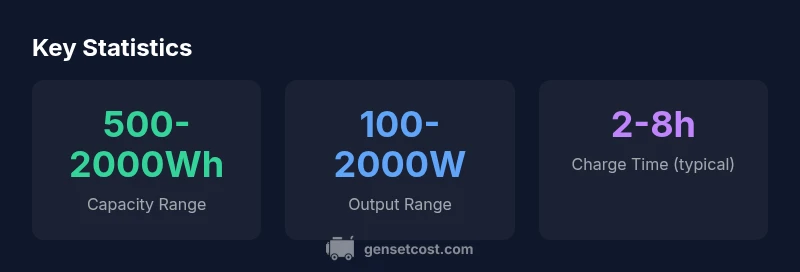
Choosing the right jackery portable power station starts with your intended load and space. Start by estimating the total wattage of the devices you want to run, then pick a model with enough capacity to cover that demand plus overhead. Battery capacity is measured in watt-hours (Wh). A model in the 300–600 Wh range is often enough for essential devices like a smartphone, laptop, router, and small fan during an outage or a camping trip, while 600–1000 Wh models cover a few more devices or a compact fridge for a few hours. For heavier use—such as running a small air conditioner or multiple high-wattage devices—look toward 1000–2000 Wh, but keep in mind heavier packs cost more and weigh more. Output options matter too: at least one AC outlet is convenient for laptops and small appliances; USB-C Power Delivery ports can fast-charge phones and laptops; USB-A ports handle older devices; some models include car-style 12V DC outlets for auto accessories. Weight and size trade-offs are real: larger capacity packs are heavier and bulkier, which reduces portability. Finally, check the solar compatibility if you plan to recharge off-grid; ensure the model supports the solar panel you intend to use and that your panel can meet the input requirements. This approach helps you avoid overpaying for unused capacity or underestimating your needs.
Charging options: AC, DC, solar
Most jackery portable power station models support charging from standard AC outlets, car adapters, and compatible solar panels. Wall charging is typically the fastest method if you have access to a home outlet, with recharge times dependent on the model and the remaining capacity. Car charging is convenient when you’re on the move but tends to be slower. Solar charging offers independence from the grid; using solar panels of adequate wattage can replenish the battery during the day, gradually adding usable capacity for evening use. When planning solar charging, consider the sun exposure, panel efficiency, and the expected daily energy needs. MPPT (maximum power point tracking) within the unit or panel helps optimize energy capture, but real-world results depend on weather and panel quality. Some higher-end Jackery models ship with faster charging technology, enabling quicker returns to full capacity after a discharge. For planning purposes, treat solar recharging as a way to backfill energy between outages or during extended outdoor stays, rather than a guaranteed rapid replenishment method. Regardless of charging method, avoid exposing the unit to extreme temperatures during charging, and store it in a cool, dry place to maintain battery health.
Real-world performance: runtime and efficiency
In practice, runtime depends on the model’s capacity and the load. A compact 300–500 Wh unit can power a laptop, router, and phone for several hours, and can reset overnight for a second day of usage with careful load management. A mid-range 600–1000 Wh model often sustains a small fridge, a fan, and a few USB devices for longer periods, while still remaining portable enough to move between rooms or vehicles. When you push into higher-wattage territory, the runtime drops quickly; a single 1000–2000 W inverter can sustain multiple devices for a few hours, but you’ll notice limited endurance for continuous high-power loads. Battery management systems help protect cells by balancing charge and disconnecting when temperature or voltage thresholds are exceeded, which can momentarily reduce output to keep the system safe. Real-world efficiency is also influenced by how you recharge: charging from a wall outlet is usually faster than solar charging in cloudy conditions. Overall, expect a reasonable balance between portability and performance for everyday outages and outdoor use. For longer outages or non-stop power, you’ll want to size up or consider supplemental storage or a secondary unit as part of a broader energy strategy.
Safety, warranty, and reliability
Jackery devices include built-in protections such as overcharge, short-circuit, and over-discharge safeguards, along with automatic shutoff when no load is detected or when the battery reaches unsafe temperatures. The units are designed to be safe for indoor use and typical outdoor environments, though care should be taken not to block vents or expose them to direct rain. Warranty terms vary by model, but most lines offer a limited warranty covering manufacturing defects for a set period. Reliability is reinforced by the BMS and modular design that makes repairs or replacements straightforward for many homeowners. When evaluating long-term value, pay attention to the availability of replacement parts and the accessibility of official service channels in your region. The Genset Cost analysis notes that owning a portable power station is about more than initial cost; it also involves ongoing charging habits, care, and the ability to scale your energy system. The right model should integrate with your existing backup plan rather than feel like a one-off gadget.
Use-case deep dive: home backup scenarios
During a grid outage, a jackery portable power station can keep essential devices running: modem, router, laptop, phone, lights, and a small fridge for a portion of the outage. In a camping or RV usage scenario, it serves as a central power hub for a camper, powering a few LED lights, a small fridge, and mobile devices. The exact combination depends on the model’s capacity and the devices’ wattage. When used as a bridge to a larger system, it can keep critical devices online while you implement a longer-term energy solution. For property managers, these units are useful in common areas or as a temporary backup during installation work or outages, enabling tenants to maintain connectivity and comfort. They also pair well with solar panels to create a low-cost, low-maintenance charging routine. The key to reliable performance is aligning capacity with your most-used loads and avoiding high-watt surges that exceed the unit’s output rating.
Port selection and output options explained
Most jackery portable power station models include a mix of AC outlets, USB-C PD ports, and USB-A ports, with some models offering car port or 12V DC outlets. The AC outlets are suitable for laptops, mini-fridges, and small appliances; USB-C PD ports enable fast charging for phones and laptops; USB-A ports can support older devices and accessories. Consider a model with at least one pure sine wave AC outlet to protect sensitive electronics. The number of ports determines how many devices you can run simultaneously; the wattage rating of each outlet matters for high-load items. If you routinely power a laptop and camera gear, a model with multiple USB-C PD ports plus a standard AC outlet can reduce the need for extra adapters. Also, check the built-in display that shows current load, battery percentage, and remaining runtime to help you manage usage effectively.
Comparisons with other brands and options
Compared to traditional gasoline generators, jackery portable power stations operate quietly, emit no exhaust, and require no fuel storage. They are easier to deploy and safe for indoor use, though they typically offer less raw power and shorter runtimes, especially under heavy loads. When stacked against other brands in the same price tier, Jackery often wins on portability, USB-C PD performance, and solar compatibility, but some competitors offer higher capacities or longer warranties. For property managers evaluating multiple options, it’s useful to consider a mix of models with varying capacity to cover different scenarios—from a compact unit for essential devices to a larger unit that can support more loads during extended outages. Genset Cost’s framework encourages comparing total ownership costs, including the likelihood of recharging during a grid outage and the potential need for reinforcement with additional storage or a secondary unit.
Costs, warranties, and total ownership
Prices for jackery portable power station models vary by capacity and outputs, typically spanning a broad range to fit different budgets. Expect a spectrum from basic, small-capacity units to higher-end packs with more outlets and faster charging. Because these devices are designed for reliability and quiet operation, they often command a premium relative to basic portable generators of similar wattage. When evaluating ownership costs, consider battery lifespan, expected cycles, and the cost of future replacements or upgrades. Warranty terms vary by model; most offer a manufacturer warranty that covers defects for a defined period, with some models including extended coverage options. For property managers, factor in lifecycle costs when planning fleet purchases and maintenance schedules. The long-term value lies in the balance between upfront investment and ongoing savings on fuel, maintenance, and labor associated with gas-powered options. Genset Cost’s framework reinforces the notion that getting the right number of units and ensuring compatible charging options can reduce total cost of ownership while boosting tenant satisfaction during outages.
Best practices for maximizing value and lifespan
To maximize value, match the model to your most frequent loads and plan for a scalable solution. Store the unit in a cool, dry place away from direct sunlight and heavy equipment. Use a high-quality, weather-appropriate solar panel if you plan to recharge off-grid, and keep cables organized to prevent wear. Schedule regular inspections of the unit’s ports, connectors, and case for signs of wear or corrosion. Keep firmware and safety features up to date where applicable, and avoid exposing the battery to extreme temperatures or deep discharges. Finally, build a small portfolio of devices that can be powered efficiently in sequence to extend runtimes and reduce unnecessary surges. This practical approach, supported by Genset Cost’s analysis, helps ensure you get reliable long-term value from your purchase.
The Good
- Silent operation and no fuel required
- Multiple outputs including USB-C PD and AC outlets
- Solar charging readiness for off-grid use
- Lightweight and highly portable for a battery unit
- Simple, user-friendly design
The Bad
- Limited runtime under heavy loads
- Higher upfront cost than basic gas generators
- Battery capacity constrains long-term power for larger loads
- Charging times can be slow at higher capacities
Best for portable, quiet backup with flexible charging
The jackery portable power station offers a compelling balance of portability, ease of use, and enough capacity for essential devices during outages or outdoor use. It is less suitable for heavy, continuous loads or whole-house backup, where larger systems or gas generators may be needed.
People Also Ask
What devices can a Jackery power station run during a power outage?
A Jackery power station can support essential devices like phones, routers, laptops, and small appliances. The exact combination depends on the model’s capacity and the devices’ wattage. For planning, list your daily must-haves and compare them against the model’s output limits.
It supports essential devices like phones, routers, and laptops, depending on capacity. Plan by listing must-haves and checking the wattage against the unit’s limits.
How long will it take to recharge a Jackery to full?
Recharge time depends on the model and the charging method. Wall charging is typically fastest, while solar recharging can vary with sunlight. Expect a few hours to several hours, depending on remaining capacity and input rate.
Recharge time varies by model and method—wall charging is usually fastest, solar depends on sun and panel size.
Can I recharge with solar panels?
Yes. Many Jackery models are designed for solar charging and work with compatible panels. Ensure the panel’s wattage matches the unit’s input capabilities and use proper solar adapters.
Yes, you can recharge with compatible solar panels; check panel wattage and adapters.
Are portable power stations safe for medical devices?
Portable power stations that provide clean, stable AC output with proper surge protection are generally safe for medical devices. Always verify impedance, total load, and device compatibility before use.
They’re typically safe for medical devices if you stay within the unit’s output limits and use stable power.
How does a Jackery compare to a gas generator?
Jackery units are quieter, emit no fumes, and are easier to store, making them ideal for indoor use and daily outages. Gas generators provide higher sustained power for long outages but require fuel, noise protection, and regular maintenance.
Gas generators offer more power for longer outages but are louder and need fuel; Jackery is quieter and easier to store.
Key Takeaways
- Choose capacity based on your essential load profile
- Prioritize models with USB-C PD and at least one AC outlet
- Plan for slower charging with solar in non-ideal conditions
- Expect premium pricing for portability and quiet operation
- Regularly maintain and inspect for longevity