Why Does My Generator Say Overload? A Practical Troubleshooting Guide
Hidden overload alerts can stall power during outages. This guide explains why overloads happen, how to diagnose common causes, and step-by-step fixes to protect your home backup generator.


A generator shows overload when the current load exceeds its rated output or a fault triggers the safety limiter. Start by reducing continuous load, verify surge-capable devices, and ensure the transfer switch and wiring are correct. If the warning persists, consult the manual or a qualified technician. Overloads can occur during startup and with new loads pushing past continuous rating.
What triggers an overload warning
If you’re wondering why does my generator say overload, you’re not alone. Most residential generators include an overload protection circuit that trips when the combined demand on the system exceeds the unit’s rated output. According to Genset Cost, overload alerts are often a signal that the load is higher than the generator can sustain over the long run or that a surge occurs when a heavy device starts up. The result is a protective shutoff or a loud warning alarm. To avoid these outcomes, begin by estimating the real-time demand on the system. List every device you expect to run during an outage, including well pumps, furnace fans, refrigeration, sump pumps, and electronics. Then compare that total with the unit’s running watts and startup surge capability. In many homes, people underestimate startup surges because they focus only on running watts. Understanding the distinction is essential to prevent repeated alarms. If the warning pops up when you start a particular appliance, note that startup surges are often much larger than running loads and may require staggered startup or temporarily shutting off other devices. In short, overload warnings are signals to rebalance loads, not a reason to replace the entire system.
How load vs. rating works
A generator’s capacity is defined by two numbers: running (continuous) watts and startup (surge) watts. The running wattage represents what the unit can sustain over long outages, while the surge wattage accounts for brief startup spikes. Your total load is the sum of every device’s running watts, plus consideration for startup surges when multiple appliances begin at once. If the combined demand surpasses the generator’s surge rating or its continuous rating, the overload protection trips. This section explains how to interpret those numbers and apply them to your home setup. Try to estimate your current running load under outage conditions and compare it to the unit’s ratings. Remember that small, high-inrush devices (like pumps or air handlers) can tilt the balance even if you’re only running a handful of appliances. A practical approach is to separate essential loads from nonessential ones and verify whether the surge requirement is within the unit’s capacity. If you’re unsure how to interpret the ratings, refer to the user manual or contact a qualified technician for a precise assessment.
Common scenarios that trigger overload
Overload warnings often arise from predictable patterns. Startups of large appliances—refrigeration compressors, well pumps, heat pumps, or air handlers—produce brief surges that can exceed the generator’s startup rating. Running too many high-wattage devices simultaneously, such as lights, space heaters, and tools, can easily push you over the limit during an outage. A misconfigured transfer switch or loose wiring can also create a false or excessive load on the generator. Additionally, an undersized generator relative to the intended essential circuit set is a frequent contributor. Finally, voltage drop from long extension cords or degraded fuel and air filters can reduce effective performance and mimic overload conditions. Understanding these scenarios helps you plan smarter and avoid repeated warnings.
Quick checks you can perform safely
Begin with nonessential loads. Switch off everything that isn’t critical for safety or comfort, then re-test. Inspect the transfer switch wiring to ensure it connects the generator to the right circuits and that no back-feed occurs. Examine power cords and extension cords for damage or distance-related voltage drop. Check fuel quality, air filters, and spark plugs if applicable, as poor maintenance can reduce efficiency and trigger protective shutdowns. If the warning recurs after these checks, it’s time to review whether the generator’s size matches the planned loads and to consider staged startup or load shedding to prevent a repeat event. Finally, document all findings so you can share them with a technician if needed.
Sizing and planning for future outages
Sizing a home backup generator is a balance between expected critical loads and budget. Start by listing essential circuits and devices, then estimate an aggregate running wattage and peak startup demand. Choose a generator with a higher continuous rating and an ample surge rating to accommodate starting surges without tripping. Consider a load-management strategy, such as smart panels or automatic transfer switches, to spread demand across different phases or circuits. If you frequently experience overload notices, it may indicate you need a larger unit or a second generator paired with a transfer switch. Remember, the goal is to maintain power for critical loads without sacrificing safety or performance. A proper sizing assessment—ideally with a professional—helps prevent future overloads and outages.
Professional help and next steps
If overload warnings persist after basic checks, it’s prudent to involve a licensed technician. They can verify wiring integrity, reassess system sizing, inspect the transfer switch, and confirm that the generator’s protection settings are appropriate for your installation. A professional can also help design a staged-start sequence and implement load-shedding strategies to keep the unit within its safe operating range. In some cases, upgrading to a higher-capacity generator or adding a second unit with a transfer switch is the safest way to ensure continuous power during outages. Keep a log of all checks and changes for future reference and safety.
Preventive maintenance and monitoring
Regular maintenance reduces the likelihood of false overload alerts. Schedule periodic inspections of fuel systems, air filters, spark plugs, and battery health. Use monitoring devices that track real-time load and alert you when thresholds approach the limit. Consider installing a smart transfer switch or a load-shedding controller to automatically balance demand during outages. By staying proactive with maintenance and monitoring, you can minimize nuisance warnings and extend the life of your generator. Finally, ensure clear signage and a safe operating area around the unit so routine checks can be performed safely.
Steps
Estimated time: 60-90 minutes
- 1
List current and planned loads
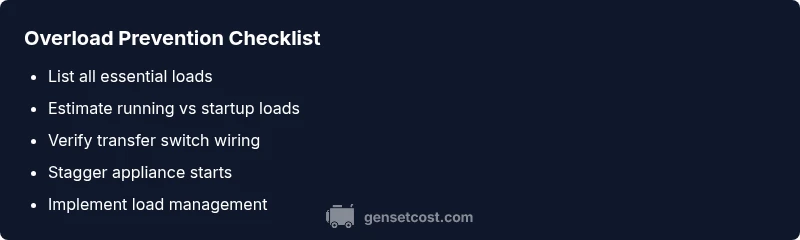
Create a complete inventory of all devices you intend to run during an outage, noting which are essential and which can be shed. Include pumps, refrigerators, HVAC components, and electronics. This baseline helps you compare real demand against generator capacity.
Tip: Take photo labels or manuals for equipment to ensure accurate wattage references. - 2
Estimate running and startup load
Add up running watts for all essential devices and estimate startup surges for the largest loads. Remember that some appliances draw a big startup burst even if they run at modest running watts. Use the manufacturer’s data or a trusted calculator to approximate values.
Tip: Favor conservative estimates; it’s safer to under-assess than to overburden during an outage. - 3
Inspect wiring and transfer switch
Check that the transfer switch is correctly wired to feed only the designated circuits and that connections are tight. Look for loose neutrals, damaged cables, or signs of overheating. A miswire can falsely register extra load and trigger overload protection.
Tip: If you’re unsure, turn off the main breaker before inspecting and consult a professional. - 4
Stagger startups and shed nonessential loads
Power down nonessential devices to reduce peak demand. Start critical equipment first, then add loads gradually, allowing the system to stabilize before turning on remaining devices. This minimizes startup surges that push the unit over its rating.
Tip: Use a simple two-step approach: essential devices first, then confirm stability before enabling other devices. - 5
Test after adjustments
Run the setup with a controlled test under simulated outage conditions. Observe whether overload warnings reappear and verify that critical loads stay powered. Document any recurring patterns to guide future decisions.
Tip: Record observations with timestamps to help a technician diagnose the issue later. - 6
Decide on upgrade or professional sizing
If overload occurs frequently with essential loads, you may need a larger generator or a second unit. A professional sizing assessment can determine the best configuration, including transfer-switch options and load-management strategies.
Tip: Plan for future outages and budget for a durable sizing solution, not just a quick fix.
Diagnosis: Generator shows overload warning during operation
Possible Causes
- highLoad demand exceeds generator rating (running + startup surges)
- mediumStartup surge from a large appliance
- lowTransfer switch wiring fault or misconfiguration
- lowUndersized generator for essential load set
- lowInaccurate load estimation due to inefficiencies or neglected devices
Fixes
- easyReduce continuous load and stagger starts of high-demand devices
- mediumVerify transfer switch wiring and correct circuit connections
- hardConsider upgrading to a larger generator or adding a second unit with proper transfer control
- easyInspect and improve maintenance: fuel quality, air filters, spark plugs and ventilation
- mediumUse a load-management device or smart panel to balance circuits
People Also Ask
What does an overload warning mean on my generator?
An overload warning indicates the current demand exceeds the unit’s capacity or a fault has triggered protective shutdown. It can stem from too many loads, a startup surge, or wiring issues. Follow safe checks and sizing steps to restore reliable power.
An overload warning means the generator is carrying more load than it can safely handle, or a fault tripped protection. Check loads, then verify wiring and consider sizing.
Can overload cause damage to my generator?
Repeated overloads can stress the generator’s components and shorten life. Protected shutoffs prevent damage, but persistent overload requires addressing load balance and possibly downsizing or upgrading.
Yes, repeated overloads can harm the generator; protection helps, but you should fix the underlying load and sizing issues.
Why does it surge when large appliances start?
Large appliances draw a high startup current that can exceed the unit’s startup rating. If several start at once, the combined surge triggers overload protection. Stagger starts to keep within limits.
Surges happen when big appliances start; stagger them to avoid hitting the limit.
How can I prevent overload in the future?
Accurately size your generator for peak load, use load management, and practice staged startup during outages. Routine maintenance and monitoring reduce false alarms and keep performance steady.
Size for peak loads, use load management, and perform staged starts to prevent overload.
When should I replace or upgrade my generator?
If you consistently hit overload with essential loads, upgrading to a higher-capacity unit or adding a second unit with proper transfer control is often the safest and most reliable solution.
If overload happens routinely with essentials, consider upgrading or adding a second unit.
Watch Video
Key Takeaways
- Beware running loads exceed rating.
- Stagger startup of heavy appliances.
- Verify transfer switch wiring and circuit assignments.
- Upgrade or add a second unit if overload persists with essential loads.
- Regular maintenance reduces false overload warnings.