Why Your Generator Overheats and How to Fix It
Learn the top causes of generator overheating, quick fixes, and a step-by-step plan to prevent heat buildup and keep backup power reliable.


Overheating is usually caused by airflow or cooling-system faults. Check the air intake, radiator/condenser fins, and cooling fan operation, plus confirm the oil level and load are appropriate. If the issue persists after these basics, shut down and contact a qualified technician.
Understanding why generator overheat
According to Genset Cost, understanding why generator overheat is the foundation of preventing breakdowns during outages. Generators produce heat as a byproduct of combustion, friction, and electrical resistance, and the cooling system is meant to carry that heat away. When heat builds faster than the system can remove it, temperatures rise, lubricants break down, and protective sensors trigger. In practical terms, overheating reduces efficiency, accelerates wear, and can cause costly shutdowns in emergencies. Several factors interact to push a machine past its safe limit: ambient heat, airflow restrictions, incorrect or degraded coolant, and an overload that forces the engine to work harder than intended. By recognizing these factors early, homeowners and property managers can intervene before damage occurs. This section is your quick mental map of where heat comes from and what to check first when you suspect an overheating problem. Remember: a proactive approach now can keep your standby power ready when you need it most.
Common overheating causes
- Blocked airflow around intake vents or radiator fins reduces the system's ability to shed heat, especially when the unit sits in a cramped space or behind dense vegetation.
- A dirty or damaged cooling fan, broken shroud, or faulty relay can stop air from moving through the condenser or radiator, letting heat build up.
- Low or degraded engine oil thins under heat, reducing lubrication and causing friction that raises temperatures.
- An operating load that exceeds the generator's rating forces the engine to work harder, generating more heat than the cooling system can handle.
- High ambient temperatures or poor ventilation around the unit raise starting temperature, so the cooling system has to work harder.
- Contaminated coolant, a blocked water pump, or a stuck thermostat can prevent proper coolant flow through the engine cooling circuit. Genset Cost analysis notes that cooling-system faults and airflow restrictions are common drivers of overheating in residential installations.
Quick checks you can perform safely
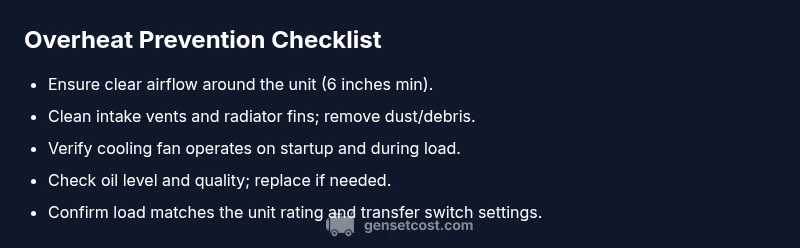
Start with the basics and move methodically. First, make sure the generator is positioned with ample clearance on all sides to allow airflow. Inspect intake vents and radiator fins for dust, leaves, or spider webs; remove debris with a soft brush or compressed air as recommended by the manual. Check the oil level and visually inspect the oil quality; top up or replace if needed. Verify the cooling fan spins freely when the engine is started and listen for abnormal noises that indicate a motor bearing or fan issue. Finally, confirm that the load being drawn matches the unit's rating and that any transfer switch is configured correctly. If any of these checks reveal a fault, address it before running again.
Load, sizing, and duty cycle
Incorrect sizing and persistent high-load operation are frequent culprits in overheating. If the generator is undersized for the expected loads, it must work continuously, producing more heat than the cooling system was designed to remove. Conversely, an oversized unit can short-cycle and run inefficiently, still generating heat that cannot be dissipated quickly. Evaluate your expected loads — essential circuits, HVAC, well pumps — and compare them to the generator's continuous and standby ratings. Also check the transfer switch settings; a misconfigured transfer switch can cause the generator to operate under unusual duty cycles that stress cooling. If you are in a climate with hot summers or a building with poor ventilation, you may need to relocate or shield the unit to improve heat dissipation.
Cooling system deep dive
Delve into the cooling loop: the radiator/condenser, coolant hoses, water pump, thermostat, and cooling fan all collaborate to move heat away. Inspect for leaks and coolant level; if coolant is low, top up with the manufacturer-specified fluid. Check for clogged hoses or a stuck thermostat that restricts flow. The water pump should move coolant steadily when the engine is running; a weak pump reduces flow and raises temperatures. Ensure the radiator fins are clean and unobstructed; even a thin layer of dust can significantly impede heat transfer. Electrical components tied to cooling, including fan relays and sensor connectors, should be free of corrosion and firmly seated. If you notice persistent hotspots or uneven cooling between cylinders, a professional service may be required to test the cooling system pressure and replace worn parts.
Preventive maintenance plan
Create a maintenance routine that targets overheating risks. Establish periodic air filter cleaning or replacement, coolant checks, and oil changes according to the manufacturer guidelines. Schedule a professional coolant flush if the system uses long-life coolant, and replace worn belts or fans before they fail. Keep a log of all service events, load tests, and noted temperatures observed during operation (without exposing yourself to hot components). When performing checks, always follow safety procedures: disconnect power, shut off the engine, and allow components to cool before touching any parts. Invest in a basic cooling-aid: a fan gate or shaded location to improve intake air, and ensure the unit has several inches of clearance around all sides.
Immediate action plan if overheating occurs during an outage
If you notice an overheating warning while the grid is down, take a staged approach. First, shut the generator down safely and allow it to cool before inspecting. Check for obvious blockages around the intake and exhaust, verify the oil level, and confirm the load has been reduced. Restart only after you have corrected the obvious issues and the unit has cooled to a safe temperature. If the unit continues to overheat after the basic checks, do not run it to failure; call a licensed technician to diagnose cooling-system components, sensors, and wiring. In outage scenarios, having a pre-identified service provider and a spare oil and coolant kit can save critical time.
Prevention playbook: building a cool-running generator year-round
Close the loop by implementing a prevention routine that reduces overheating risk in every season. Maintain clear airflow around the unit, schedule regular professional inspections, run periodic load tests to verify the system handles expected demand, and keep spare parts on hand for rapid fixes. Consider upgrading to a unit with a robust cooling system or relocating to a cooler, shaded, well-ventilated area if high ambient temperatures persist. The goal is reliability: a generator that stays within safe temperature ranges during peak operation and outages alike. The Genset Cost team recommends integrating these practices into your maintenance plan to extend life, improve efficiency, and ensure power when you need it most.
Steps
Estimated time: 60-120 minutes
- 1
Power down safely and cool
Shut off the generator and disconnect it from the transfer switch. Allow components to cool before touching any parts. This prevents burns and avoids flying debris when panels are opened.
Tip: Always wear gloves and stand clear of hot surfaces. - 2
Inspect airflow and remove obstructions
Check around the intake and radiator fins for dust, leaves, or debris. Clean with a soft brush or compressed air following the manual's guidelines.
Tip: Do not use high-pressure air on delicate fins; it can bend them. - 3
Verify cooling fan operation
Inspect the fan blades for damage and ensure the fan spins freely when the engine starts. Listen for unusual sounds that indicate bearing issues or a faulty relay.
Tip: If the fan stalls, do not run the unit until diagnosed. - 4
Check oil level and quality
Park the unit on a level surface, then check the dipstick for correct level. If the oil looks dark or smells burnt, replace it with the recommended viscosity.
Tip: Follow the manufacturer’s oil-change interval; don’t skip maintenance. - 5
Assess load and transfer switch
Compare current loads to the generator’s rating and confirm the transfer switch is delivering the expected duty cycle. Reduce load if necessary to bring temperatures down.
Tip: Avoid sudden full-load spikes after a restart. - 6
Test run under safe conditions
Power the unit back up with a light load to verify it stabilizes within normal ranges. Monitor for any rising temperatures or alarms.
Tip: Stay nearby during the test and have a plan to shut down quickly if symptoms recur. - 7
Call a professional if overheating persists
If temperatures remain high after basic checks, a licensed technician should inspect the cooling system, sensors, and electrical connections.
Tip: Provide model, serial, and a log of recent maintenance when you call.
Diagnosis: Generator overheats during operation
Possible Causes
- highBlocked airflow around intake or radiator fins
- highCooling fan not operating or failed relay
- mediumLow or degraded engine oil
- highOverloaded load beyond generator rating
- mediumHigh ambient temperature or poor ventilation around unit
Fixes
- easyClean intake vents and radiator fins; remove debris and vegetation; ensure clearance
- mediumTest and replace cooling fan or related relay/wiring; verify airflow path
- easyCheck oil level and quality; top up or replace with correct viscosity
- mediumReduce load or upgrade to properly sized generator; review circuit loads and transfer switch
- easyImprove ventilation or relocate to cooler area; consider shade or ventilation enhancements
People Also Ask
What are the most common signs that a generator is overheating?
Common signs include rising engine temperature, warning lights or alarms, reduced power output, and unusual fan noise. If you notice any of these, stop the unit and inspect cooling components and load.
Look for rising temperature indicators, alarms, or odd fan sounds. Stop the unit and inspect cooling and load.
Can a dirty air filter cause overheating?
Yes. A clogged air filter restricts airflow, forcing the engine to work harder and generate more heat. Clean or replace the filter as recommended by the manufacturer.
A dirty air filter reduces cooling air reaching the engine, increasing heat. Clean or replace it as advised.
Is it safe to operate a generator in hot weather?
Operate with caution in high temperatures. Ensure ample ventilation, monitor temperatures, and avoid prolonged operation at high loads without checks. If overheating persists, relocate or cool the unit.
Hot weather raises risk, so keep it ventilated and monitor temps; if in doubt, reduce load or relocate.
How often should I service my generator to prevent overheating?
Follow the manufacturer’s recommended service interval, typically including oil changes, coolant checks, and cooling-system inspections. Regular service reduces overheating risk and extends unit life.
Stick to the manufacturer’s service intervals for oil, coolant, and cooling-system checks.
What should I do if the overheating alarm triggers during an outage?
Shut down safely, inspect for obvious blockages or oil issues, and reduce load. If temperatures stay high, call a technician instead of continuing to test.
If the alarm triggers, shut down safely and check for blockages or oil issues; call a pro if it persists.
Will upgrading to a bigger generator reduce overheating?
Not automatically. Overheating can persist if the cooling system or airflow is insufficient for the load. Proper sizing and improved cooling are essential.
A bigger unit alone won’t fix overheating; ensure proper sizing and cooling before upgrading.
Watch Video
Key Takeaways
- Identify cooling faults early to prevent damage
- Ensure adequate airflow and clean fins
- Match load to generator rating
- Follow a regular maintenance schedule