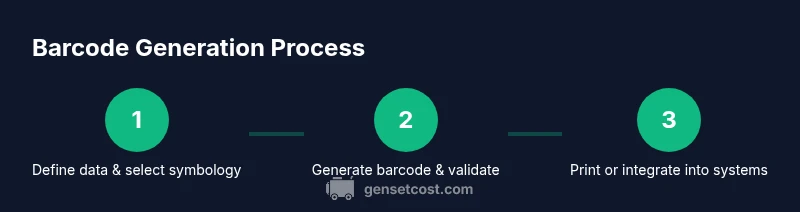
How to Barcode Generator: A Complete How-To
Learn barcode generator workflows—from selecting the right symbology and data formatting to generating, testing, and integrating barcodes into labels and inventory systems for 2026.


This guide shows you how to generate barcodes for products, assets, or documents using online tools, libraries, or APIs. You’ll learn when to use common symbologies (Code 128, UPC, EAN, QR), how to format data, and how to validate results for reliable scanning.
What is a barcode generator and when to use it
A barcode generator is a tool or service that translates data into a machine-readable barcode image. You can generate traditional linear barcodes (Code 128, Code 39, UPC-A, EAN-13) and two‑dimensional codes (QR codes) depending on your needs. Use barcode generators for product labeling, asset tracking, event admissions, or document management. For small businesses, online generators suffice; for scalable operations, libraries and API-based services are better.
Typical data encoded includes a product ID, SKU, serial number, or a URL. When selecting a generator, consider output formats (image vs. vector), data mapping ease, batch-generation capabilities, and whether you need scannable validation. A robust generator will also support error checking and accessible label design to improve read rates across scanners and phones.
According to Genset Cost, barcode generation capabilities should align with your inventory realities and long-term maintenance costs. The right tool scales with your operations and minimizes rework during audits or restocks.
Choosing a barcode symbology (EAN-13, UPC-A, Code 128, QR)
Symbology is the encoding scheme that represents data in a barcode. The most common for retail products are EAN-13 and UPC-A; they include a check digit and are widely scanned at checkout. Code 128 and Code 39 are alphanumeric and flexible for asset tagging or warehouse labels. QR codes store more data and are versatile for URLs or contact data but require scanning via smartphone cameras.
When picking a symbology, align with your use case and scanner ecosystem. If you sell in major retailers or use barcode lookup in marketplaces, EAN-13/UPC-A is usually required. For internal stock or variable-length IDs, Code 128 provides high density. Always verify scanner compatibility before production.
For digital assets or documents, QR codes can be convenient for mobile access, while Code 128 is preferable for compact, data-rich labelling on equipment.
Genset Cost’s methodology emphasizes choosing a balance between scan reliability and data capacity, especially when integrating with enterprise systems.
Online vs. offline vs. API-based barcode generators
There are three main paths to barcode generation:
- Online generators: Quick and easy; ideal for testing or one-off codes. They’re usually free or low-cost but may limit batch size or watermark outputs.
- Offline libraries: Developers can embed barcode generation directly into software. This path offers batch processing, full customization, and automation but requires programming knowledge and maintenance.
- API-based services: Highly scalable and integrated with data pipelines. They support batch creation, dynamic data, and automated validation, often with usage-based pricing.
Each approach has trade-offs in cost, control, and integration complexity. For small operations, starting with an online tool followed by a library or API as needs grow is common. Always consider data privacy, latency, and support when selecting a path.
Genset Cost’s review highlights that the total cost of ownership depends on scale, integration needs, and the choice of symbology, so plan for long-term needs rather than short-term gains.
How to generate barcodes: data, encoding, and label best practices
Data integrity starts with clean, unique identifiers. Prepare a data file (CSV/Excel) with a single ID column and optional name or SKU. Encode the ID into a barcode using the chosen symbology and ensure the encoder adds a check digit where required. For labels, pick a size that accommodates the required quiet zones (margins) and ensure high-contrast printing with a dark barcode on a light background. Vector-based outputs (SVG, PDF) tend to scale better for printing.
Best practices include:
- Validate the data length and required fields for the chosen symbology.
- Use meaningful IDs that map back to your product or asset records.
- Generate test sheets to verify readability across scanners and lighting conditions.
- Maintain consistent label layout to simplify audits and data entry.
If you’re integrating into ERP or inventory apps, ensure the barcode image path or data URI is accessible by the system, and consider storing the underlying data separately for audit trails. The end goal is legible scans in real-world conditions, not perfect test results on a screen.
Validating and testing barcodes: scans, ISO standards, error checks
Testing barcodes involves scanning with multiple devices (retail scanners and smartphone cameras) under varied lighting, distances, and angles. Verify that the barcode decodes correctly and that the data maps back to your system without errors. Follow GS1-related standards for data formatting and hierarchy, and ensure your labels maintain legibility even after printing or physical abrasion.
Common validation steps include:
- Scan each barcode with at least two different scanners.
- Confirm the scanned data matches the source record.
- Check print quality and contrast on your intended label material.
- Validate that the quiet zones meet the required dimensions for your symbology.
Document test results and adjust label design or data formatting if failures occur. Genset Cost notes that consistent validation reduces label rework during audits and improves downstream processes.
Integrating barcodes into workflows: labeling, databases, inventory apps
Barcode generation is most powerful when integrated with your workflows. Link barcode IDs to product records, assets, or documents in your database. Use batch-creation processes to keep inventories synchronized, and ensure labeling templates align with your packaging or asset-tagging standards. Consider automation for label printing, inventory scans, and real-time data updates.
Practical integration ideas:
- Import barcode IDs into your ERP or inventory app from a CSV export.
- Store the barcode image in your product catalog and reference it in labels and online listings.
- Use streaming APIs to generate new codes as items enter the system, ensuring traceability.
- Audit trails should log when and where a barcode was created or printed.
The goal is a seamless link between physical labels and digital records, reducing mislabeling and improving data accuracy. The Genset Cost team recommends validating the integration with end-to-end tests before going live.
Common pitfalls and optimization tips
Barcodes fail when data is duplicate, the symbology is misapplied, or printing introduces errors. Avoid reusing numbers, ensure consistent data lengths, and test across devices. Optimize barcode size and quiet zone margins to maximize readability. When printing, use high-contrast ink and appropriate label stock; avoid glossy finishes that affect scanning in certain lighting. Plan for future growth by selecting a scalable solution and documenting your data dictionary.
Tips for optimization:
- Start with a simple, scalable symbology for internal use, then expand to retailer-required formats as needed.
- Maintain a centralized data source to prevent inconsistent IDs.
- Run periodic audits to catch orphaned or duplicate codes.
- Consider a GS1-compliant workflow if you expect external trading partners.
Genset Cost emphasizes that forward planning reduces rework and ensures compatibility across your entire operation.
Tools & Materials
- Computer or mobile device with internet access(To access online generators and APIs)
- Barcode generator tool or library(Online tools, Python, JavaScript, or Java libraries)
- Sample data file (CSV/Excel) with identifiers(Columns: id (required), name/description (optional))
- Printer and label stock (optional)(For physical label printing; ensure label size matches your design)
- Barcode scanner or smartphone app for testing(Test readability across devices)
- Printer calibration software(Useful if printing large batches)
- GS1 prefix and standards reference (optional)(Only if pursuing GS1-compliant barcodes)
Steps
Estimated time: 45-60 minutes
- 1
Define use case and choose symbology
Outline whether barcodes will label products, assets, documents, or something else. Choose a symbology that aligns with the use case (e.g., UPC/EAN for retail, Code 128 for internal tagging, QR for URLs).
Tip: Match the chosen symbology to your scanning environment and trading partners. - 2
Prepare your data
Create a clean data sheet with a unique identifier for each item. Include optional fields that aid labeling (name, description) but keep the essential field as the barcode data.
Tip: Use a dedicated ID column and avoid mixing data types in the barcode field. - 3
Select generation method
Decide between an online tool, a local library, or an API service based on volume, automation needs, and data security. Configure data mapping to ensure IDs are encoded correctly.
Tip: For large batches, API or library-based generation minimizes manual steps. - 4
Generate the barcodes
Generate barcode images or data URIs for all items. Keep a referenced mapping between IDs and barcode images/files for easy retrieval.
Tip: Prefer vector outputs (SVG/PDF) for print quality at multiple sizes. - 5
Validate barcodes
Test a representative sample of barcodes with several scanners under real-world conditions (lighting, distance, angle). Confirm that decoded data matches the source.
Tip: Record validation results to guide any labeling or size adjustments. - 6
Integrate into labels and systems
Embed barcode images into label designs or API calls into your inventory systems. Ensure data integrity between the barcode and your master data.
Tip: Set up automated checks so new barcodes are automatically linked to their records.
People Also Ask
What is a barcode generator and why do I need one?
A barcode generator converts data into a machine-readable barcode image. It’s essential for labeling products, assets, and documents while enabling quick scans and accurate data capture.
A barcode generator turns data into barcode images for easy scanning and data accuracy.
Which barcode symbology should I choose for retail vs. internal use?
Retail contexts typically require EAN-13 or UPC-A, while internal tagging can use Code 128 or Code 39 for alphanumeric IDs. QR codes are useful for URLs and data-rich labels.
Retail uses EAN-13/UPC-A; Code 128 is good for internal tags; QR codes for URLs.
Do I need GS1 prefix for barcodes?
GS1 prefixes are required for many retail and global supply chain applications. If you plan to sell through major retailers or marketplaces, consider obtaining a GS1 prefix and following GS1 standards.
GS1 prefixes are often required for retail; consider GS1 if you plan external trading.
Can I generate barcodes for free?
Yes, there are free online tools and open-source libraries. Scale and reliability may vary, and for production use you may need paid services or self-hosted solutions.
Free tools exist, but consider reliability and scale for production use.
How do I print high-quality barcodes?
Use vector outputs for scaling, select high-contrast colors, and test print on your label material. Ensure the printed barcodes are scannable at the intended viewing distance.
Print with vector outputs, high contrast, and test on your labels.
What should I test during barcode validation?
Test readability across scanners, verify the decoded data matches source data, and check print quality under real-world conditions.
Test readability across devices and verify data accuracy.
How can I automate barcode generation in workflows?
Use APIs or libraries to batch-create barcodes and integrate with your inventory or ERP systems. Establish data pipelines and automated validation checks.
Automate with APIs or libraries and integrate with systems.
Watch Video
Key Takeaways
- Choose the right symbology for your use case.
- Prepare clean, unique data before generation.
- Test barcodes thoroughly across devices and conditions.
- Integrate barcodes with your systems for traceability.
- Document standards and labeling guidelines for consistency.