Why Is My Generator Not Charging My Inverter? A Practical Troubleshooting Guide
Urgent, practical guidance to diagnose and fix why your generator isn’t charging your inverter. Step-by-step diagnostics, safe checks, and maintenance tips for homeowners and property managers (2026 edition).


If your generator isn’t charging your inverter, the most likely culprits are a tripped transfer switch, an insufficient charging path, or a faulty inverter charger. Start with safety checks, verify power paths from the generator to the inverter, confirm proper settings, and inspect wiring and connections. If the issue persists, consult your manual or a licensed technician.
Understanding the charging path between generator, transfer switch, and inverter
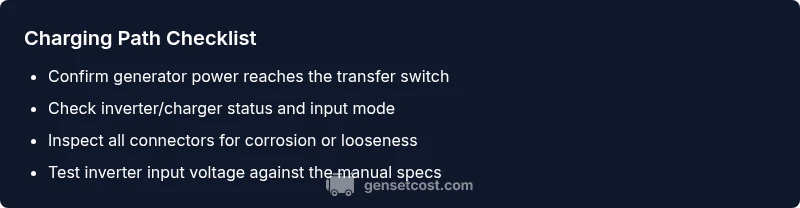
In most home backup systems, the generator provides AC power that is routed through a charging circuit to the inverter/charger, which then maintains the battery bank or powers critical loads. The exact wiring depends on your setup, but the essential idea is the generator creates energy that must pass through the transfer switch, then into the inverter's input. If you’re asking why is my generator not charging my inverter, the answer often lies in one imperfect link in that path. Begin by verifying that power actually reaches the transfer switch when the generator is running, and confirm that the inverter/charger is configured to accept external charging. Even with a running engine, a misconfigured input or a tripped switch can block charging entirely. This is why a structured approach helps—start at the source (the generator) and work toward the load (the inverter and battery).
Common causes of charging issues in a home backup setup
Most charging problems fall into a few categories: a) Transfer switch or main breakers tripped; b) The inverter/charger is in a protection mode due to overload or heat; c) The generator is running but at too low RPM or voltage; d) Loose, corroded, or damaged wiring/connectors; e) Mismatched equipment or configuration; f) Battery health or inverter failure. The key is to think in terms of the power path: source, path, load. If any link fails, charging stops. According to Genset Cost, issues commonly trace to the transfer switch or inverter protection, not necessarily to the battery alone. Start with the simplest checks: is the generator producing power? Is the transfer switch closed? Are input fuses intact? These questions guide you toward the right component to inspect.
Safety-first checks you can perform before deep troubleshooting
Before you touch live electrical components, confirm the area is dry, clear of obstacles, and you are wearing PPE. Start with the basics: ensure the generator is on a stable surface, the fuel supply is adequate, and the battery is connected securely if you have a battery-based inverter. Check that the inverter is powered on and in the correct mode to accept external charging. Do not bypass safety devices or jump into wiring repairs without proper training. If any device feels unusually hot or emits a burning smell, stop and seek professional help immediately.
How to diagnose with simple measurements and indicators
Look for LED indicators on both the generator and inverter. A green light typically means healthy operation, while amber or red can signal protection modes or fault conditions. If you have a multimeter, carefully measure the generator output at the receptacle, then at the transfer switch input and the inverter input. Compare values against your equipment’s manual specifications. If measurements show normal voltage at the source but none at the inverter input, the fault lies in the path (switch, wiring, or connectors). Safety first: disconnect all live circuits before probing wires beyond the service panels.
The role of the transfer switch, breakers, and fuses
The transfer switch is the gatekeeper that determines whether generator power or utility power feeds the inverter and loads. A tripped switch or a blown fuse can block charging even when the generator runs smoothly. Check the transfer switch position, listen for mechanical clicks indicating reset, and inspect breakers for trips. If a breaker trips again after reset, there is likely a downstream fault—do not keep resetting indefinitely. In some setups, the inverter has its own protective fuses; verify they are intact and properly seated. Correct wiring, secure connections, and matching input ratings across devices are essential for reliable charging.
When to call a professional and how to prepare
If the charging path appears intact but charging still fails, or you hear unusual noises, smells, or see erratic indicators, escalate to a licensed electrician or generator technician. Gather model numbers, voltage readings, and a list of symptoms before the call. This helps the professional diagnose quickly and reduces downtime. Regular maintenance plans with a technician can catch hidden faults early and prevent outages during power loss.
Preventive maintenance to reduce future charging problems
Schedule routine inspections of the transfer switch, breakers, and inverter connections. Clean corrosion from terminals, reseat connectors, and replace worn fuses as needed. Keep a log of battery health, generator service dates, and test runs. By maintaining clean contacts and verifying compatibility among components, you reduce the likelihood of charging interruptions during an outage.
Steps
Estimated time: 60-90 minutes
- 1
Power down safely and inspect basics
Power off both the generator and inverter. If you have battery connections, disconnect per manufacturer guidance and ensure the area is dry. Confirm fuel and oil levels, and confirm the generator is on a stable surface before touching wiring.
Tip: Always wear PPE and follow lockout/tagout procedures when possible. - 2
Check transfer switch and main breakers
Open the transfer switch panel and look for tripped indicators or popped breakers. If you find a tripped device, reset it once and observe whether the problem reoccurs. Do not force a reset if the switch shows physical damage.
Tip: Reset one device at a time and test after each reset. - 3
Verify generator RPM and power output
Start the generator and verify it reaches its intended operating RPM. If possible, measure the output voltage at the generator receptacle. If voltage is low or fluctuating, the generator may not be supplying a stable charging path.
Tip: Consult the manual for the correct RPM range and voltage targets. - 4
Inspect inverter/charger status and cabling
Check the inverter/charger indicators; reseat all input/output cables and inspect for signs of corrosion or looseness. Ensure input mode is set to accept external charging and that there are no protection alerts.
Tip: Loose connections are a common cause—tighten connectors per torque specs. - 5
Isolate the fault with a known-good component
If you have access to a spare inverter or a known-good battery, substitute one component at a time to locate the failing part. This step helps confirm whether the issue lies with the inverter, battery, or wiring.
Tip: Avoid cross-wiring; label tested components to prevent mix-ups. - 6
Escalate if unresolved and document findings
If charging still fails, document readings (voltage, indicators, trip codes) and contact a professional. Share the diagnostic notes to speed up service and maintain a repair log for future outages.
Tip: Create a simple one-page report with dates and observed symptoms.
Diagnosis: Generator won't charge inverter during operation
Possible Causes
- highTripped transfer switch or main breaker
- highInverter/charger protection mode (overload/overheat)
- mediumInsufficient generator RPM or voltage
- mediumLoose or corroded wiring/connections
- lowMismatched configuration or input voltage range
Fixes
- easyReset transfer switch and main breaker; re-test charging
- easyInspect inverter/charger status, reseat connections, check fuses, test with a known-good inverter
- mediumIncrease generator RPM to rated speed within manual specs; reduce load if needed
- mediumInspect cables and connectors for corrosion or damage; replace as needed
- easyVerify compatibility and input range across devices; consult the manuals
People Also Ask
Why is my generator not charging my inverter even when it’s running?
Common causes include a tripped transfer switch, inverter protection mode, or a wiring issue. Start by confirming power reaches the transfer switch, then inspect the inverter input settings and connections. If the fault persists, consult the manual or a technician.
Most times, the problem is the transfer switch or inverter protection. Check the switch and input settings first.
What should I check first when charging stops suddenly?
Verify the generator is producing power, the transfer switch is correctly set, and the inverter input is enabled for external charging. Look for visible trips or blown fuses and reset only one device at a time.
Start with power presence, then the switch and inverter input settings.
Is a transfer switch required to charge the inverter?
In most setups, yes. The transfer switch routes power from the generator to the inverter and protects other circuits. Make sure it’s not tripped and that wiring matches the system manual.
Most systems need a transfer switch to route generator power to the inverter.
Can battery or inverter failure cause charging issues?
Yes. A degraded battery or a faulty inverter charger can prevent charging even when the generator runs. Test with a known-good component if possible and review inverter fault codes.
Battery or inverter faults can stop charging; testing with good parts helps identify the issue.
Should I reset the inverter or generator during troubleshooting?
Power-cycle both devices by turning them off and on again following the manual. This can clear protective states but should be done methodically to avoid re-tripping.
Sometimes a reset clears protective modes; do it step by step.
When is professional help necessary?
If you cannot locate the fault after basic checks, or you hear unusual noises, see smoke, or smell burnt insulation, contact a licensed technician. Prompt professional help prevents further damage.
Call a professional if the issue persists after the basic checks or you notice signs of damage.
Watch Video
Key Takeaways
- Check the charging path end-to-end before replacing parts
- Reset safeties first and re-test
- Inspect connections and test voltage with care
- Avoid overload; ensure generator capacity matches load
- Document findings to prevent repeat outages