Generator Size to Power Your House: A Complete Sizing Guide
Learn how to size a generator to power your house with a practical, step-by-step approach. This guide covers load estimation, surge considerations, and how to choose between portable and standby options for homeowners and property managers.


This guide explains how to calculate the generator size to power house, covering load estimation, surge considerations, and practical workflows for homeowners. Start with a precise load list, separate running watts from surge watts, and add a safety margin. The result is reliable backup power without overpaying for unused capacity. Understanding the generator size to power house is the keystone of a resilient home power plan. This approach also helps you compare portable vs standby options and plan for future loads.
Why sizing matters
Choosing the right generator size to power house is essential for reliability, safety, and efficiency. A properly sized generator minimizes nuisance tripping, reduces wear on appliances, and lowers operating costs over time. According to Genset Cost, the right sizing strategy prevents both undersizing and oversized purchases, which can burden homeowners with unnecessary fuel use or expensive equipment. Start with a clear understanding that some loads are essential (refrigeration, medical devices, heating systems) while others can be deferred or managed by an energy-saving plan. The goal is a unit that covers critical circuits without paying for unused capacity. By focusing on real loads and future-proofing, you’ll get a generator that serves you well during outages and power interruptions.
How to estimate your home's load
Begin with a comprehensive load inventory. List every appliance, device, and circuit you intend to back up. Group them into essential and nonessential categories. For each item, identify its running watts (the power it needs to operate continuously) and, when applicable, its surge watts (the extra power required to start motors or compressors). Use labeling on equipment or manufacturer specifications to capture these figures. If exact values aren’t available, estimate conservatively by comparing similar items and rounding up to the nearest tens or hundreds of watts. This step sets the foundation for a reliable and safe sizing process.
Understanding starting watts vs running watts
Running watts describe continuous power draw, while starting watts capture the brief surge when motors start up. A refrigerator or sump pump may draw a high starting wattage briefly before settling into running watts. Failing to account for starting watts leads to nuisance trips, equipment damage, or an underpowered system. The sizing approach should reserve enough surge headroom to accommodate simultaneous starts, such as a fridge compressor and a furnace blower kicking in at the same moment. Always verify both running and starting wattages from labels or manufacturers.
A practical sizing workflow for homeowners
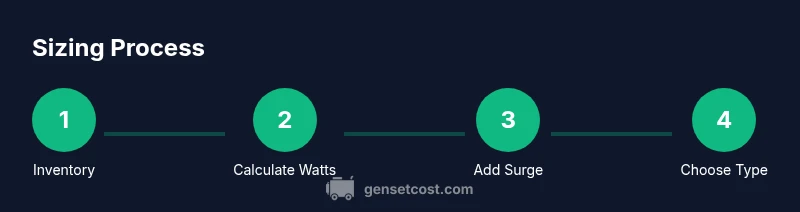
- Create a household load list and categorize essential vs nonessential.
- Collect running and starting watts for each item from labels, manuals, or manufacturer specs.
- Sum running watts for essential circuits and add the estimated surge wattage for at least one high-demand device.
- Apply a safety margin (typically 20-25%) to cover minor fluctuations and future needs.
- Choose a generator type (portable vs standby) based on installation practicality, budget, and long-term use plans.
- Confirm the final size with a load calculator or professional consultation to ensure compatibility with your panel and transfer switch.
This workflow helps you align your generator choice with actual demand, not just peak capacity.
Portable vs standby: choosing the right type
Portable generators are typically less expensive upfront and offer flexibility for seasonal use or multiple locations. Standby generators are permanently installed and automatically start during outages, providing seamless power but at a higher initial cost. When sizing, consider fuel type (gasoline, propane, natural gas) and maintenance needs. A correctly sized standby unit often offers smoother operation and instant recovery, which can be critical for homes with medical equipment or security systems. Evaluate your budget, space, and how often you expect outages to decide which path suits you best.
Sizing for essential circuits and whole-house backup
A common approach is to size for essential circuits first, ensuring core comfort and safety. If you want whole-house backup, you’ll need to account for the central air system, water heater, and other high-draw loads. In practice, most homeowners start with essential loads and gradually expand as needs evolve. Remember to review transfer-switch compatibility and panel capacity, which are crucial for safe integration with your home’s electrical system. This balanced method provides resilience without overspending on unnecessary capacity.
Common mistakes and how to avoid them
- Skipping a full load inventory: Always inventory all potential loads to avoid under-sizing.
- Forgetting surge wattage: Always reserve extra surge headroom for motorized devices.
- Ignoring future needs: Plan for potential additions like a second refrigerator or future renovations.
- Choosing based on price alone: Consider reliability, fuel availability, and service support.
- Overlooking transfer switch compatibility: Ensure your panel and switch can handle the selected generator type.
Example: mapping a small home scenario
Consider a small two-bedroom home with these essential items: refrigerator, freezer, lighting throughout the home, a sump pump, Wi-Fi router, a sump pump, a gas furnace blower (no electric heating), and a water fountain. Running watts for each essential item are estimated conservatively, and starting watts are accounted for by the most demanding appliance. A 7-12 kW range is a practical target for this scenario with a safety margin. Tailor the final figure after confirming actual device names and wattage from labels. This example demonstrates how a disciplined load approach yields a realistic size rather than a guess.
Factors that influence generator size: fuel type, efficiency, futureproofing
Fuel type (gasoline, propane, natural gas) affects running costs, availability, and storage needs. Efficiency and engine design influence both running and starting performance—look for units with higher efficiency ratings and robust surge handling. Finally, futureproofing means leaving room for additional loads like a pool pump, EV charger, or new appliances. A well-documented sizing process helps you plan upgrades and avoid costly changes after installation.
Tools & Materials
- Electrical load list(Document each circuit and device you intend to back up, with nominal wattages if available.)
- Clamp meter or multimeter(Use to verify circuit loads and panel current draw during typical usage.)
- Manufacturer specs or labels(Obtain running and starting watts for essential devices.)
- Load calculator or spreadsheet(For organizing calculations and applying safety margins.)
- Pen and notebook(Capture notes during measurement and decision points.)
Steps
Estimated time: 1-2 hours
- 1
Inventory all loads
List every device and circuit you want to back up. Include lighting, appliances, HVAC components, pumps, and communication devices. Group them by importance (essential vs nonessential) to prioritize in the final sizing.
Tip: Start with critical loads like refrigerator, lighting, and medical devices; you can add comfort loads later. - 2
Identify running and starting watts
Collect watts for each item, noting whether it’s running watts or surge watts. When data is missing, use manufacturer manuals or online specs and round up to the nearest practical increment.
Tip: Don’t rely on rough memory; exact wattage makes a big difference in accuracy. - 3
Sum the essential running watts
Add together the running watts of all essential items. This gives a baseline for minimum capability. Don’t include nonessential devices yet.
Tip: Tally in small groups to avoid double-counting shared loads (e.g., a single central lighting circuit). - 4
Estimate surge for top devices
Identify the largest starting wattage needed by any single device (often a fridge or pump). Add this surge to the running watts to see the peak demand.
Tip: If multiple devices start simultaneously, consider higher surge headroom. - 5
Apply a safety margin
Add 20-25% to the combined running and surge watts to accommodate minor fluctuations and future needs.
Tip: Better to have a little extra headroom than to trip on startup during outages. - 6
Choose generator type
Decide between portable and standby options based on installation constraints, budget, and intended use. Portable units are flexible; standby units offer automatic transfer and seamless power.
Tip: Consider transfer-switch compatibility with your existing panel. - 7
Verify with a load calculator
Cross-check your target size using a reputable load calculator or consult a qualified electrician to confirm the figures.
Tip: Use a calculator that supports both running and starting watts for accuracy. - 8
Document future-proofing plan
Note potential future loads and adjust your target size to avoid rework after changes.
Tip: Revisit the sizing plan after renovations or additions to ensure continued reliability.
People Also Ask
What size generator do I need to power my house?
There is no one-size-fits-all answer. Size depends on your essential loads, starting surges, and desired comfort during outages. Start with a baseline of essential circuits, then expand as needed.
Start with your essential loads and surge needs; size can vary by home. You’ll refine it using a load calculator.
Why is surge wattage important?
Surge watts cover the extra power motors require when starting. If you ignore surge, your generator may trip or stall when appliances start.
Surge wattage is the extra power motors need to start; without it, you risk tripping the breaker.
Can I size for essential loads only?
Yes. Sizing for essential loads provides resilience during outages and is a practical starting point. You can add nonessential loads later as needed.
You can start with essential loads and expand as needed.
How do I decide between portable and standby?
Portable units are versatile and cheaper upfront, while standby units offer automatic transfer and continuous power. Your choice depends on budget, installation feasibility, and how often outages occur.
Portable is cheaper upfront; standby offers automatic power during outages.
Should I plan for future upgrades?
Yes. Anticipate possible additions like an EV charger or extra HVAC capacity and leave some headroom in your sizing plan.
Always plan for future upgrades when sizing.
Watch Video
Key Takeaways
- Start with a detailed load list and essential vs nonessential loads.
- Account for both running watts and starting watts to avoid trips.
- Apply a safety margin to cover fluctuations and future upgrades.
- Choose portable vs standby based on budget, space, and needs.
- Verify final size with a load calculator and professional input.